Your business. Your data. Easy to manage.
luxData.easy keeps track of what you have, where it is, and when it was last inspected. This applies to assets as well as equipment, spaces, vehicles, and rooms. In the office, you work with spreadsheets and maps; on the go, you use the app.

Knowledge resides in people's minds and in spreadsheets.
Scattered
There's an Excel list here, a folder there, and a lot of it is just in the heads of individual coworkers.
Out of date
Changes made outside the office don't reach the office until days later—if at all.
Unsubstantiated
In the event of an emergency, there is a lack of documentation regarding inspection deadlines, maintenance records, and hygiene checks.
Record. Plan. Verify.
These four tasks arise in every business, regardless of what is managed there.
Build up inventory
You can import existing Excel lists or record inventory on-site using the app. You decide which property types and fields you need.
Keeping Recurring Issues Under Control
You can record inspections, maintenance, cleaning, and checks, specifying their frequency and who is responsible. You can see at a glance what needs to be done.
Fully documented
Every action is recorded for each property, including the date, person, cause, and photo. You can generate the documentation with the click of a button.
Resolve Issues Quickly
You enter a report, assign it, process it, and document the result. This can be done on the go and without any paperwork.
What this changes.
The goal isn't the software itself, but a business that knows what it has and can demonstrate what it does.
One place instead of many lists
Equipment, devices, areas, vehicles, and rooms are all listed in a single inventory. There is no need to reconcile the information between the spreadsheet, the folder, and your memory.
Always up to date, because it's maintained on site
Any findings made in the field are immediately entered into the inventory. Once a finding is made and entered, there is no going back to the office.
Documents at the Touch of a Button
Every inspection, maintenance task, and malfunction is documented on-site with the date, the person responsible, and a photo. In the event of an emergency, the relevant records are thus already fully documented and immediately available.
Proactive rather than reactive
Deadlines and statuses are known before anything goes wrong. Staff, materials, and the budget can be adjusted accordingly.
Ready to Go Without an IT Project
No server, no installation, no GIS knowledge required. Experience has shown that it takes less than an hour to get started.
Grows with Your Tasks
You can create new object types yourself. What starts today with playgrounds will include vehicles, building systems, and equipment tomorrow.
You decide what constitutes an object.
luxData.easy is structured like a table and displays each object on the map at the same time. Three questions define the framework: Who works with it, what is being managed, and in what form does it appear on the map? The following sections are ready-made templates and are not limiting.
Who works with it
Every industry, from manufacturing and services to construction and operations.
Production & Technology
Buildings & Real Estate
Operations & Supply
Services & Facilities
What Is Managed
The spectrum ranges from municipal assets to the company's own equipment.
Transportation and Infrastructure
Everything related to the street environment.
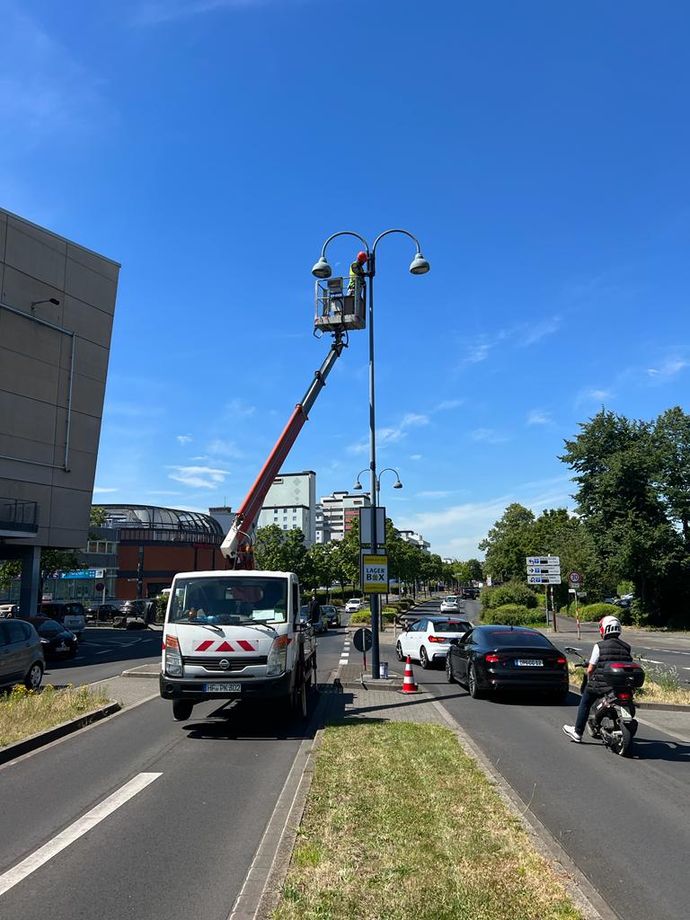
- Street Lighting
- Traffic light systems
- Traffic Signs and Directional Signs
- Parking ticket machines
- Barrier Systems
- Bridges
- Tunnel
- Roads and Sidewalks
- Bicycle Lanes
- Bus stops and bus shelters
- Speed Measurements
- Pumping stations
Public Buildings
Building Systems and Technology.
- Elevators
- Escalators
- Automatic Doors
- Heating Systems
- Air Conditioning and Ventilation Systems
- Emergency Power Generators
- Fire Alarm Systems
- Fire Extinguishers and Fire Suppression Systems
- Smoke Exhaust Systems
- Watches
Public Safety
Safety, Warning, and Emergency Technology.
- Video Surveillance Systems
- Emergency call boxes
- Sirens
- Digital Information Displays
- Fire Department Radio and Communication Systems
- Defibrillators
- Fire hydrants
Green Spaces and Recreation
Care, Play, and Recreation.
- Playground Equipment and Playgrounds
- Sports Facilities
- Drinking fountains
- Irrigation Systems
- Trees Subject to Traffic Safety Requirements
- Park benches
- Barbecue Areas
Waste Management
Collection, Disposal, and Recycling.
- Trash container
- Underground container
- Recycling collection sites
- Waste compactors
- Recycling facilities
- Trash cans and dog waste bag dispensers
Energy Supply
Electricity, Heat, and Grid Systems.
- Substations
- Transformers
- Electrical Distribution Boxes
- Solar Systems on Public Buildings
- Electric vehicle charging stations
- District Heating Systems
Public Transit
Rail, Bus, and Passenger Information.
- Train stations and stops
- Ticket Vending Machines
- Display Boards
- Railway tracks
- Overhead wires
- Elevators and Escalators at Train Stations
Smart City Technology
Sensors, Networks, and Displays.
- Environmental Monitoring Stations
- Traffic Sensors
- Wi-Fi hotspots
- Smart Street Lighting
- Digital Information Kiosks
- Fiber Optics
In what form
Each object appears on the map as a point, line, or shape.
Point Objects
Lighting, traffic signal systems, distribution cabinets, and the utility cadastre are each located at a fixed location.
Line Objects
Cables, wires, and other linear network structures follow a route and are laid out in a straight line.
Area Objects
Wi-Fi coverage, public green spaces and parks, and playgrounds extend across an area.
luxData.easy is not limited to specific object types or industries. Object types and fields can be freely defined, so the application adapts to your work—not the other way around.

The work begins on site.
Any findings outside should be added to the inventory immediately. Using the app, your employees can record and correct asset data right on-site, including photos and location. As soon as there is a signal again, everything syncs automatically.
Even without a network
Download maps for offline use; sync them later.
Photo and Location
The image and GPS coordinates are attached to the object.
Correct on the spot
Move misplaced objects to the correct location.
Barcodes and Navigation
Scan an object and let the system guide you to the destination.


From reporting the issue to resolving it.
luxData.easy combines asset management, mobile maintenance, and digital incident management into a complete, ready-to-use solution. A report is processed without anyone having to transfer data between systems. And whoever submitted the report is notified of the outcome.
Fault Input
A problem is reported through the portal, logged by phone, or recorded by our own staff directly on-site. The location and a photo are included.
Scheduling
The report is linked to the affected asset in the inventory. Assess the urgency, assign responsibility, and place an order—all within the same view as the asset.
Processing
On site, the person in charge retrieves the work order, documents the repair with a photo, and updates the status. This can be done even without an internet connection; the data is uploaded later.
Feedback
The person who submitted the report can see the status of the issue, and any follow-up questions are handled via the comment feature. The action is saved with the item as a record.
Unlike when sending an email to a general address, the process doesn't end with the administration. The person who reported the issue is notified that the report has been received and when it was resolved. This eliminates the need for follow-up inquiries and prevents the same problem from being reported multiple times.
Without a media break
From the initial report to the supporting documentation, it remains a single data record. Nothing is transferred between the portal, the database, and the file folder.
Around the clock
Notifications come in regardless of business hours—whether you're at your computer or on the go with your smartphone.
No duplicate entries
If you'd like to report an issue, you can check the map to see if the problem has already been reported at that location.
So you don't have to start from scratch.
Assessment
If an inventory does not yet exist, we will retrieve your data from databases, spreadsheets, and lists, or take inventory on-site. We will create the appropriate data collection forms for this purpose.
See our services →Setup and Training
You will receive a fully configured environment with your object types and fields. Training sessions will introduce you to the system, and workshops will then help you gain a deeper understanding using your own data.
See our services →Not limited to a specific industry.
Because luxData.easy allows you to freely define object types and fields, the application is suitable for any situation where documentation is required. Over 150 users are already working with it.
How others use luxData.easy.
User stories from a wide variety of fields. Each one illustrates the same task in a different way.


Tell us what you'd like to manage.
In 30 minutes, we'll show you how to map out your inventory. The consultation is non-binding and requires no installation.