From a lead to evidence.
luxData.easy combines asset management, mobile maintenance, and digital incident management into a complete, ready-to-use solution. A work order is processed from the initial entry through scheduling and on-site work all the way to confirmation back to the person who submitted the request. No one has to transfer data from one system to another.
Phone call, email, note.
In many businesses and local governments, damage reports are still submitted by phone, email, or in handwritten form. As a result, the information needed to process these reports is often missing. This leads to follow-up inquiries, additional administrative work, and longer processing times.
What's Missing from the Report
Without these four pieces of information, the process begins with an investigation rather than a repair.
- The exact location of the damage
- A photo that gives an idea of the size
- The unambiguous assignment to the affected facility
- A clear history of the process
What is typically reported
The larger the area and the more extensive the inventory, the more important a digitally supported approach becomes.
- Streetlights Out
- Damaged Traffic Signs
- Defective playground equipment
- Vandalism against facilities
- Damage to green spaces
- Damage to utility infrastructure
Those who are there every day are the first to notice it.
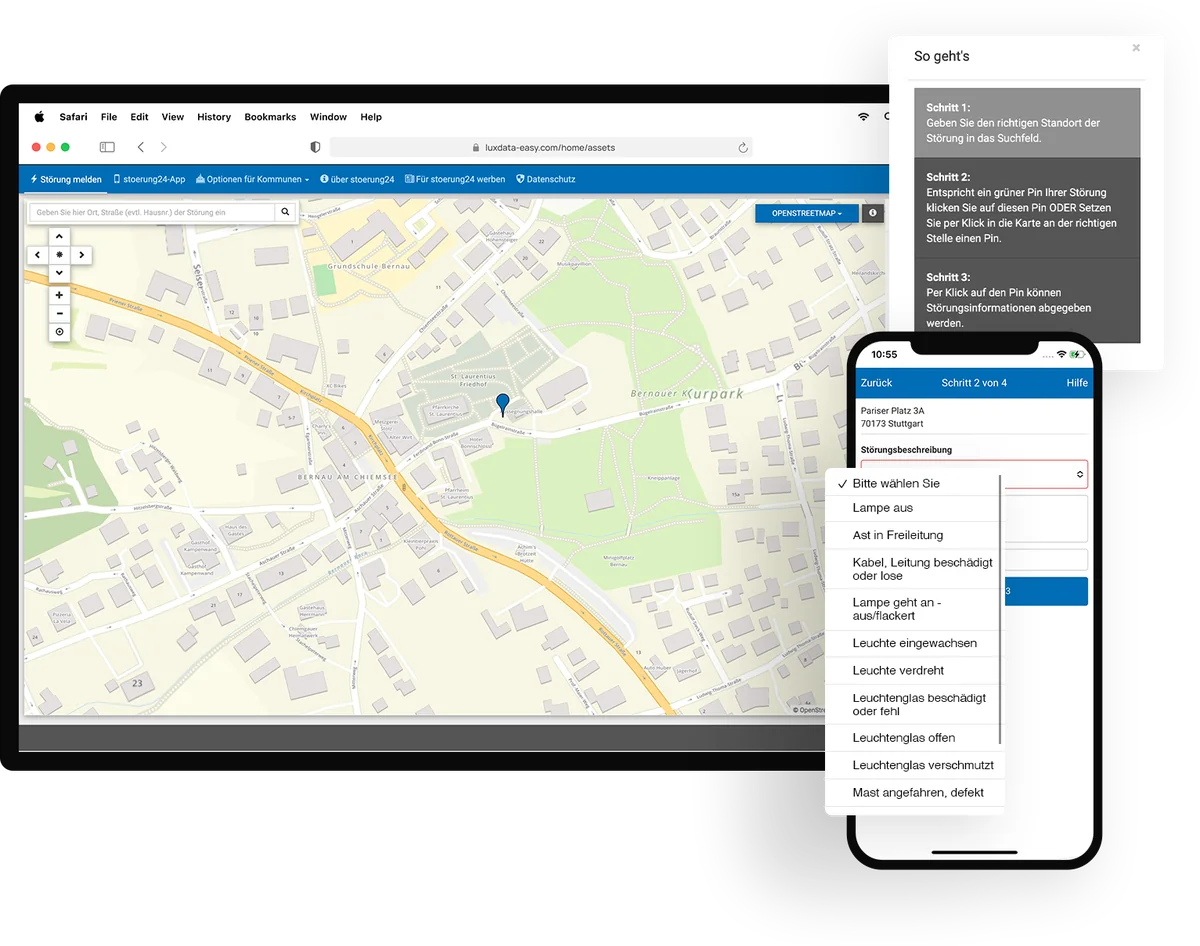
Residents and city employees often identify many problems much sooner than a scheduled inspection would. Through the stoerung24 incident reporting portal, they can submit a report in just a few steps, including a photo and the exact location. The report is then sent digitally to the appropriate department.
Quick and easy to report
The claim is filed online in four steps, with no registration required.
Location-specific
The location is selected on the map or determined based on the device's position.
With photo
A picture is worth more than a description and makes it easier to assess the situation in the office.
Embedded in your website
The registration form runs as an embedded section on your own website. Your residents and customers remain on your site throughout the process.
Around the clock
Reports come in regardless of business hours—even on weekends and while on the go via smartphone.
Fewer follow-up questions
Since the location, photo, and description are available from the start, there's no need to make follow-up phone calls.
No duplicate entries
The map shows whether a problem has already been reported at this location.
Status visible to the person reporting
Anyone who has submitted a report can track its progress and ask questions using the comment feature.
Report a problem with stoerung24: When you play the video, YouTube opens in a new window and data is transmitted to Google.
Six steps, one process.
The entire process, from the initial report to the final documentation, takes place within a single system. The current status of a report and who is processing it can be viewed at any stage.
Report a Problem
A resident reports a malfunctioning streetlight via stoerung24, including a photo and the location. The report can just as easily be taken over the phone or entered by a staff member directly at the site.
Automatic Assignment
The report is assigned to the appropriate department or directly to the affected facility. This ensures that it is linked to the correct object and does not end up in a mailbox.
Evaluation and Prioritization
Your employees review the report, assess its urgency, and plan the necessary actions. The item's history is displayed right next to it.
Resource Planning
The company's own field service team or a contracted service provider is assigned the task of resolving the issue. The person in charge is notified of the new ticket.
Mobile Feedback
On site, the technician documents the work performed, attaches photos, and updates the status. This works even without a network connection; the data is received the next time a connection is established.
Complete documentation
All actions are stored for the affected item and are permanently available for analysis, maintenance planning, and documentation. The person who submitted the report can see that their report has been resolved.
What the data reveals.
Digitized incident management isn't just beneficial for day-to-day operations. The recorded incidents form the basis for decisions regarding budgets and investments because they turn assumptions into verifiable figures.
Which types of systems cause a particularly high number of malfunctions?
Grouping by property type highlights where it makes more sense to replace something rather than repair it again.
In which areas do problems occur repeatedly?
The map shows areas of concern within the region. Vandalism and structural weaknesses thus stand out as patterns rather than isolated incidents.
How long do processing times take, on average?
The receipt and completion of a task result in verifiable processing times, including for external reporting.
Which investments will improve availability in the long term?
With reliable figures, a budget request becomes a well-founded priority.
One process instead of many hand-offs.
The combination of stoerung24 and luxData.easy creates a seamless digital workflow. Reports are recorded centrally, assigned to the appropriate systems, and documented until the issue is resolved.
Faster response times
The report is immediately available in its entirety. There are no phone calls or forwarding steps between receipt and assignment.
Higher Data Quality
The location, photo, and property reference are part of the report and are not the result of a subsequent search.
Less administrative work
Nothing is retyped or transferred to a second list. The process is created once and remains a single entity.
Transparent Processing
For each report, you can see who is handling it, how urgent it is, and what stage it is at.
Better Communication
The reporter stays informed. A complaint is turned into a traceable process with a visible outcome.
Complete documentation
It is possible to verify at any time—even years later and even to third parties—what was done, when, and by whom.
What that looks like in everyday life.
luxData.easyApp
The app for on-site work. View jobs, attach photos, and set statuses—even without an internet connection.
Go to the app →From Real-World Experience
One year after their introduction, naturenergie netze GmbH reports on digital annual inspections and fault reporting via stoerung24.
See user reviews →All Features
Inventory, Maps, Inspection and Maintenance, Reports. These are the areas where day-to-day work takes place.
About the features →Show us the route of today's outage.
We'll walk you through your workflow together in 30 minutes and show you what it looks like in luxData.easy and stoerung24.