Everything luxData.easy can do.
The areas where daily work takes place. The examples range from lighting fixtures to playgrounds to building systems, since these functions are not limited to any specific type of facility.
Record and Maintain Inventory
The foundation: What you manage, with the details that matter to you.
Freely Define Object Types
You define the types of objects that exist and the fields associated with them. No programming required, and the system can be expanded at any time.
Import Data
Existing Excel lists, CSV files, and databases can be imported. Exporting works the same way.
Consistent Input
Required fields and drop-down lists ensure that identical information is entered consistently.
Map Mappings
Objects can be organized into a hierarchical structure, such as components of a system or devices at a location.
Documents and Photos
Reports, invoices, data sheets, and images are stored directly with the item rather than in a separate filing system.
Track Changes
For each object, you can see who changed which detail and when.
Map and Location
Every object has a location. The map reveals connections that a table does not show.
Point, Line, and Plane
Individual objects, routes, and areas are all displayed together on a map.
Customizable Background
A city map, an aerial view, or a neutral depiction—depending on what you want to focus on.
Colors by Feature
Status, age, due date, or a custom field determine the color coding. You can spot anomalies before you even start searching.
Overview when zooming out
Objects that are close together are grouped so that the map remains easy to read.
Custom Layers
Additional map layers can be displayed, such as district boundaries or jurisdictional boundaries.
Coordinates from Addresses
If a dataset is available only as an address list, the sixData geocoder extracts the coordinates from it.
Inspection and Maintenance
Recurring tasks become part of your routine rather than something you have to remember.
Set Intervals
Inspections, maintenance, cleaning, and checks are scheduled on a recurring basis, which determines when the next one is due.
Keeping Track of Due Dates
Upcoming events are filtered and displayed on the map; they can be narrowed down by time period and property type.
Responsibilities
Tasks can be assigned to individuals, teams, or external service providers.
Document the results
For each action, the date, the person who performed it, the findings, and a photo are recorded.
Complete History
The history of all work performed on a property remains permanently accessible.
Generate a report
The evidence is derived from the entries without having to be compiled separately.
Malfunctions and Alerts
A seamless process from the initial report to resolution.
The entire process in detail →Go to the stoerung24.de portal ↗
Notification at the property
A fault is recorded where it occurs and remains associated with the object.
Assign and Process
Reports are assigned, processed, and closed. Their status can be viewed at any time.
Reports from Outside
Through the stoerung24 incident reporting portal, you can receive reports from employees or members of the public.
Clarify any questions
A comment feature keeps all discussions about the issue in one place.
Notification
The person in charge is notified of new tasks, including on their mobile device.
Evaluable
Clusters by property type, area, or time period become visible and can be incorporated into the planning process.
Embedded in your website
The registration form runs as an embedded section on your own website. Your residents and customers remain on your site throughout the process.
Around the clock
Notifications come in regardless of business hours—whether you're at your computer or on the go with your smartphone.
There are no duplicate entries
The map shows whether a problem at this location has already been reported. The same light will not be reported more than once.
Without a media break
Reporting, processing, and verification are all contained in a single data record. Nothing is transferred between systems.
Working on the Go
luxData.easyApp brings inventory information right to where the work is happening.
Android and iOS
The app runs on smartphones and tablets and uses the same database as the portal.
Even without a network
Maps can be downloaded for offline use. The data collected will be transmitted as soon as a signal is available again.
Photo and Location
Images and GPS coordinates are directly linked to the object.
Correct on the spot
Objects that have been placed in the wrong location can be moved to the correct spot.
Barcodes and Navigation
Access items using a barcode and let the system guide you to your destination.
Announcements
New tasks and malfunctions are displayed as notifications on the device for the person in charge.


Analyze and Report
Well-maintained data is only valuable if you can ask questions of it.
Filter by any field
Any attributes can be combined. The selection applies to both the table and the map.
Save Filter
Frequently used queries are saved as favorites and can be accessed with a single click.
Statistics
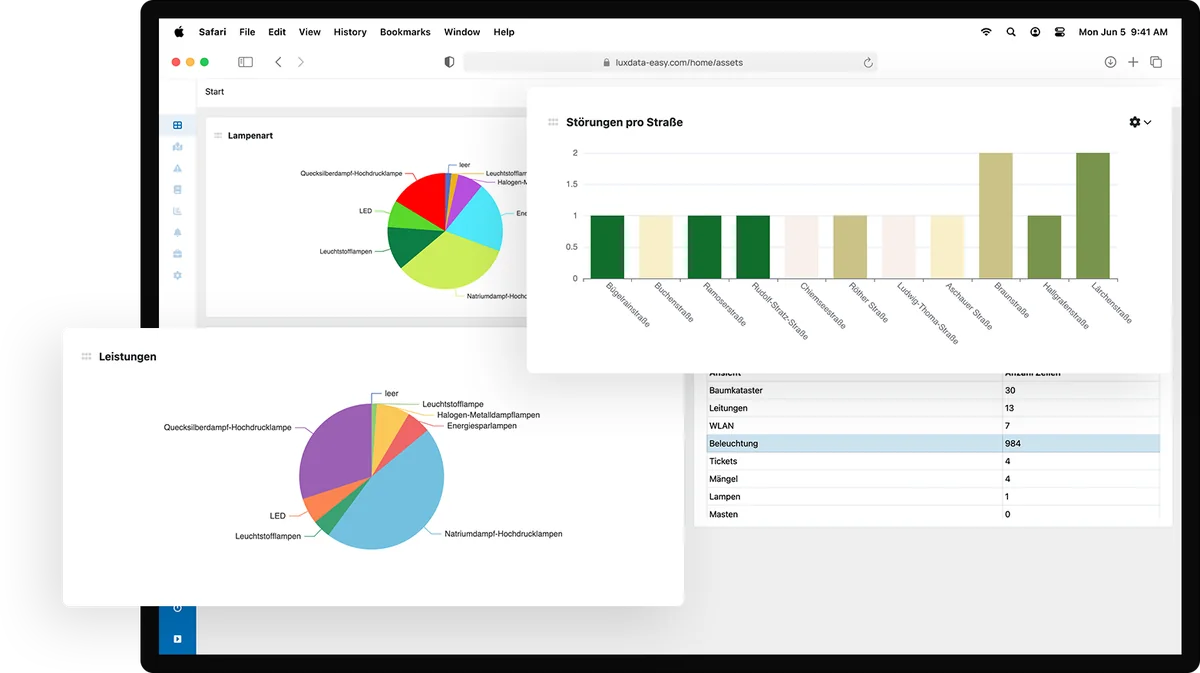
Status distribution, due dates, and notifications by category or time period are available at a glance.
Export to Excel
Any selection can be exported and processed further externally.
Basis for Decisions
Based on the current status of the inventory, it is possible to estimate the workload expected for the coming year.
Reports for Third Parties
Reports can be submitted to committees, clients, or auditing agencies.
Users and Permissions
Everyone sees what they need and changes only what they're allowed to.
Own Entrances
Each person works with their own account. This makes it possible to track changes.
Tiered Rights
Reading, editing, and managing can be separated, depending on the task at hand.
Narrow Down Categories
Access can be restricted to specific object types or areas.
Involve service providers
External parties are granted targeted access to what they need to carry out their assignment.
From any location
Access is via the browser. The public works department, city hall, and field staff all work in the same system.
Operating costs included
sixData handles backups, monitoring, and updates.
The best way to see this is by looking at your own inventory.
We'll set up an account with sample data and show you in 30 minutes how your properties can be displayed.